

Overview
When an alert fires, Deeptrace kicks off an investigation analyzing your logs, traces, and recent commits. Building a working theory for what went wrong, Deeptrace surfaces a concise RCA directly in Slack with evidence and recommendations to resolve the issue.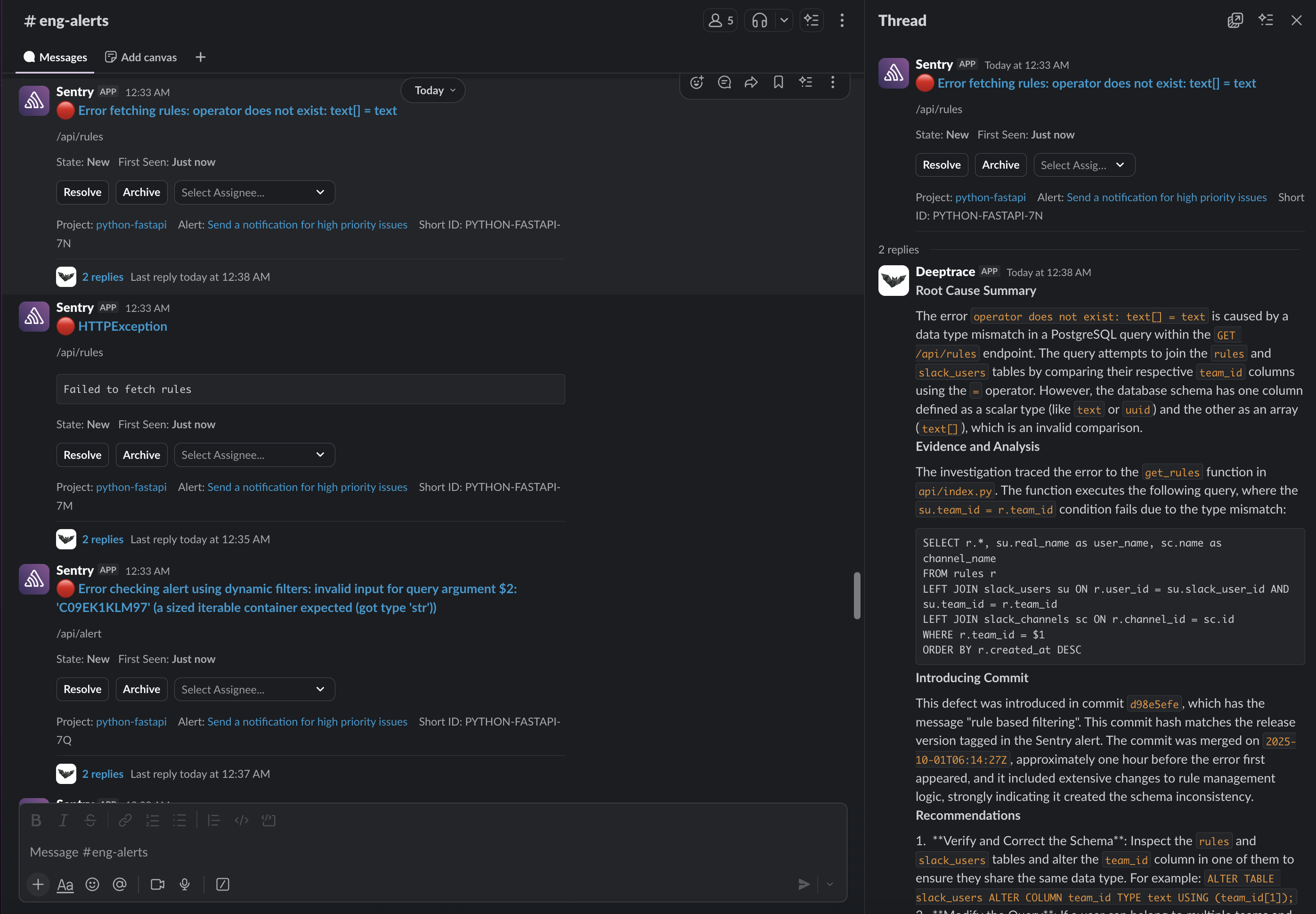
Deeptrace analyzing a Sentry alert and surfacing a real-time RCA in Slack.
Why teams use Deeptrace?
Modern engineering teams are drowning in alerts — too many signals, not enough clarity. Teams using Deeptrace:- Accelerate incident response - automatically investigate alerts and surface the most likely root cause
- Point engineers in the right direction - summarize what went wrong and where to start looking.
- Route issues to the appropriate owner - identify the relevant logs, commits, or teammate(s) responsible.
- Reduce context switching - pull together logs, traces, and commits directly in Slack so engineers don’t go digging through tools.